Elik Shima
Solo developer · Tokyo個人開発者 · 東京 Building on ClaudeClaudeで開発

AI-native tools for sound, voice and video. 音・声・映像のための、AIネイティブなツールをつくっています。

I'm a solo developer with a background in app development, video production and audio production. I'm building a Claude-powered narration pipeline and a local-first Japanese dictation app, and I run them end to end myself. アプリ開発、映像制作、音響制作のバックグラウンドを持つ個人開発者です。Claudeを中核に据えたナレーション制作パイプラインと、完全ローカルで動く日本語音声入力アプリを、企画から運用まで一人でつくっています。

e−t/τ sin 2πfta damped oscillation that turns into a text cursor — the JP Dictate icon減衰振動がテキストカーソルに変わる — JP Dictate のアイコン
01

What I'm buildingいまつくっているもの

Two products, both about speech: one generates it, the other recognizes it. どちらも「声」を扱う2つのプロダクトです。1つは声をつくり、もう1つは声を認識します。

A

JP Dictate

macOS · Swift · Claude Haiku 5.5

A Japanese push-to-talk dictation app for the Mac menu bar. Hold fn to record, release to paste at the cursor. Recognition runs entirely on the device; audio never leaves the Mac. Hold Shift as well for cleanup mode: only the recognized text goes to Claude Haiku 5.5, which fixes punctuation, removes fillers and corrects obvious typos without rewording. Macのメニューバーで動く、日本語専用のpush-to-talk音声入力アプリです。fnを押している間だけ録音し、離すとカーソル位置に貼り付けます。認識はすべてMac上で行い、音声は外に出ません。Shiftも一緒に押すと清書モードになり、認識した文章だけをClaude Haiku 5.5に送って、言い回しは変えずに句読点・言いよどみ・明らかな誤字を整えます。

Error rate文字誤り率
4.2%character error rate (Apple built-in)Apple内蔵の認識
Latency応答
~70msmedian, after the key is releasedキーを離してからの中央値
Sizeサイズ
<1MBself-contained app, no Python単体アプリ、Python不要
Built with開発
Written entirely with Claude CodeすべてClaude Codeで開発

Measured on 72 read-aloud sentences (4.2%) and 24 multi-sentence passages (4.6%). Real-voice results vary. 読み上げ72文(4.2%)と複数文24本(4.6%)での測定。実際の声では変わることがあります。
Source code on GitHub →GitHubでソースコードを見る →

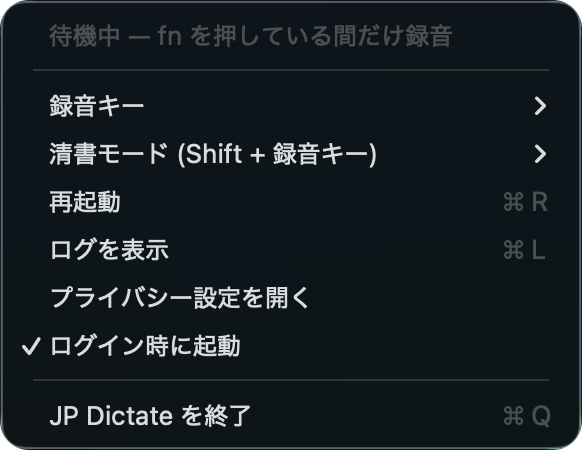
JP Dictate menu bar menu
The menu bar menuメニューバーのメニュー
B

Narration pipelineナレーション制作パイプライン

Claude · Python

Turns a topic into a finished long-form narrated educational video for sleep and long-form listening, in Japanese and English. Claude writes the script from a verified fact sheet; separate checks catch what a model can't hear for itself. テーマから、睡眠・ながら聞き向けの、長尺の教養ナレーション動画(日本語・英語)までを、ほぼ自動で仕上げます。Claudeが検証済みのファクトシートから台本を書き、モデルが自分では聞き取れない不具合は別の検査で拾います。

  1. Sources & allow-list素材取得(許可リスト)
  2. Fact sheet & outlineファクトシート・構成
  3. Script台本Claude
  4. Fact-check事実確認Claude
  5. Narration (TTS)音声合成
  6. Audio QA音声の検査
  7. Mix with ambience / music環境音・BGMのミックス
  8. Video render映像化
02

How I use ClaudeClaudeの使い方

Claude is not a feature bolted on; it is the writing and verification core of the pipeline, and the tool I build it with. Claudeは後付けの機能ではなく、パイプラインの執筆と検証の中核であり、それをつくるための道具でもあります。

In production本番で

Batch API as an independent second reviewerバッチ処理を「2人目の監査」に

Message Batches API · Claude Opus 5.5

The pipeline's English-language scripts get a second, independent fact-check through the Claude Message Batches API. Each chapter goes to Claude Opus 5.5, which checks every number and date with web search limited to authoritative primary sources. Results are not needed right away, so it runs on the lower-cost batch tier. It works alongside an audit in Claude Code, and a script is corrected only after the two reviews are reconciled. The setup is code, so it runs the same way on the next script. パイプラインの英語版の台本は、ClaudeのMessage Batches APIで、もう一度、独立した事実確認をしています。章ごとにClaude Opus 5.5へ送り、信頼できる一次資料に絞ったWeb検索で、数字や日付を一つずつ確かめます。すぐに結果が要らない処理なので、割安なバッチ処理に回しています。Claude Codeでの監査と並ぶ「2人目の監査」として使い、両方の結果を突き合わせてから台本を直しています。仕組みはコードにしてあるので、次の台本でもそのまま使えます。

Claude API in production本番でのClaude API

The pipeline calls Claude Opus 5.5 through the API to write each script from a fact sheet and outline verified with Claude Code. A separate Claude call fact-checks it. パイプラインがClaude APIでClaude Opus 5.5を呼び出し、Claude Codeで検証したファクトシートと構成案から、台本を書きます。別のClaude呼び出しが事実確認を行います。

Model selection by blind testブラインドテストでのモデル選定

I compare Opus 5.5 and Sonnet 5.5 with a blind A/B harness: two scripts, automated fact-checks, a report, and the model identities revealed only after I have read both. Cost is logged on every run, so quality and price are compared side by side. Opus 5.5とSonnet 5.5を、ブラインドA/Bで比較しています。台本2本を自動の事実確認にかけてレポートにし、読み比べが終わるまでどちらのモデルかは伏せます。料金も毎回記録して、品質と費用を並べて比べています。

Built with Claude CodeClaude Codeで開発

Both products are developed with Claude Code; JP Dictate was written entirely with it. For the pipeline, decisions, failure modes and listening notes live in a handover file the agent reads at the start of every session, so work compounds instead of restarting. 2つのプロダクトをClaude Codeで開発しており、JP Dictateはすべてをそれで書いています。パイプラインでは、決定事項、失敗の記録、聴き取りの所見を引き継ぎファイルにまとめ、毎回の会話の冒頭でエージェントが読み込むので、作業が積み上がります。

In the toolchain制作の道具で

Claude in the creative toolchain制作の道具のなかのClaude

Exploring Claude-driven editing and compositionClaude主導の編集・作曲を模索中

MCP · DaVinci Resolve · Logic Pro

I edit video in DaVinci Resolve and produce its music in Logic Pro. I'm exploring operating both from Claude through MCP, for video editing and for composition. It is not part of my current production workflow yet. 映像編集はDaVinci Resolve、その映像のBGM制作はLogic Proで行っています。これらをMCP経由でClaudeから操作し、映像編集や作曲に活かす方法を模索中です。現在の制作フローでは、まだ使っていません。

Claude-generated MIDIClaudeが生成するMIDI

MIDI · Logic Pro

Claude generates the MIDI for background harmony that changes with each chapter, written to avoid clashing with the base drone. I mix it in Logic Pro. 章ごとに和音が変わる背景音のMIDIをClaudeが生成します。土台のドローンとぶつかる音は使わないように組んでいます。ミックスはLogic Proで行います。

Blender scenes from dataデータから作るBlenderの映像

Blender · Python

Claude Code writes the Blender scripts that render animations and cutaway views from public scientific datasets. 公開されている科学データから、アニメーションや断面図を描画するBlenderのスクリプトを、Claude Codeで書いています。

Beyond the modelモデルの外で

Audio QA a model can't do for itselfモデルが自分ではできない、音の検査

Synthetic speech fails silently: no error, just a whistle partway through, a drifting voice, or a loop back to the first line. I built checks for each of these failures. 合成音声はエラーを出さずに壊れます。途中で混じる笛のような高い音、声質のずれ、冒頭に戻って読み続ける、など。それぞれを拾う検査をつくっています。

Check検査Catches拾うもの
Whistle / noise detector笛の音の検出High-pitched artefacts that appear in long generations長い生成で出る高い音の混入
ASR round-trip文字起こしでの照合Skipped, repeated or looped text読み抜け、読みすぎ、繰り返し
Voice-drift check声質のずれの検査Chunks whose timbre departs from the reference voice基準の声から外れた区間
Fluctuation-preserving mix揺らぎを壊さないミックスOver-processed ambience (no compressor, no auto-leveling)環境音の加工しすぎ(コンプレッサー・自動音量調整は不使用)
03

Background経歴

Formerly at a major creative agency; now independent, and still working with them, mainly on content production. I hold everything I make to a high standard of quality, across software, video and sound, all in one person's hands. 大手クリエイティブエージェンシーに所属していた経験があり、現在は独立して、引き続き関わりながら、主にコンテンツ制作の仕事をしています。ソフトウェア、映像、音響のすべてを一人で手がけ、つくるものすべてにクオリティを強く求めています。

App developmentアプリ開発

Building macOS apps and tooling in Swift and Python. JP Dictate's source code is public on GitHub.SwiftとPythonでmacOSアプリやツールを開発中です。JP Dictateのソースコードは、GitHubで公開しています。

Video production映像制作

Content production is my main work: shooting and editing. Educational video is a personal project I'm working on now.コンテンツ制作がメインの仕事で、撮影と編集を担当します。教育向け映像は、いま取り組んでいる個人プロジェクトです。

Audio production音響制作

Audio recording, mixing, mastering and sound design.音声収録、ミックス、マスタリング、音響設計。

04

Contact連絡先

Solo developer based in Tokyo, Japan. Happy to talk about AI-native tools, audio and video production, or building on Claude. 東京を拠点とする個人開発者です。AIネイティブなツール、音響・映像制作、Claudeを使った開発についてお気軽にどうぞ。